






macOS Tahoe 26.2 – Edge Light — Your Mac’s Built-in Virtual Ring Light
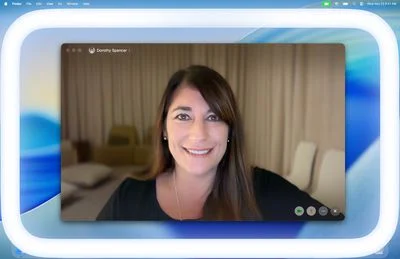
Apple macOS Tahoe 26.2 introduces Edge Light, a smart display-based lighting effect that enhances your image during video calls (FaceTime, Zoom, Teams, etc.) by providing soft illumination around your face:
- Utilizes your Mac’s built-in display to create a halo-like lighting effect, acting like an automatic ring-light.
- Customizable controls allow adjustment of light width and color temperature, enabling you to match your personal or ambient lighting preference.
- Proximity-aware design dims the light when you move your cursor near the screen edge, ensuring it doesn’t interfere with on-screen content.
- Auto-activation on compatible Apple Silicon Macs (2024+ models): the system detects low-light environments and automatically turns Edge Light on.
- Powered by Apple’s Neural Engine and Image Signal Processor, Edge Light intelligently adjusts to face position and ambient brightness for natural, flattering illumination.
Technical Mechanics Behind Edge Light
| Component | Role & Functionality |
| Neural Engine | Detects face shape, location, and ensures even light placement |
| Image Signal Processor (ISP) | Evaluates ambient brightness to adjust effect smoothly |
| Display hardware | Emulates ring-light effect via edge illumination |
This tight integration of neural processing and real-time display output ensures a live, adaptive enhancement during video calls—no plugins or third-party apps needed.
Other Noteworthy Enhancements
Beyond Edge Light, macOS Tahoe 26.2 delivers several subtle yet impactful features:
- Reminders App: “Urgent” flag with alarms
- Mark tasks as urgent to trigger cross-device alarms (iPhone/iPad) — no immediate sound on Mac.
- AirDrop safety upgrade
- With unknown contacts, a verification code appears on the receiver’s device that must be entered on the sender’s, adding a layer of security.
- Podcasts enhancements
- Smart auto-generated chapters for better navigation and clickable episode links.
- Games library filtering
- New filters let you sort titles by category, size, or challenge progress.
- Freeform adjustments
- Enhanced table support with greater flexibility on embedded content.
- Apple News & Music
- News app gains improved navigation; Apple Music adds a “Favorite Songs” auto-playlist in Top Picks.
Power Users: Cluster Macs via Thunderbolt 5
macOS Tahoe 26.2 introduces a low-latency clustering feature that enables multiple Macs (especially M-series devices) to link via Thunderbolt 5:
- Ideal for developers and AI enthusiasts: build powerful compute clusters by combining RAM/CPU/GPU resources.
- Supports machine learning workloads and pro-grade tasks—e.g., running LLMs across a Mac cluster.
- Latency optimized for inter‑device communication, ushering in a new era of on‑prem Mac-based parallel computing.
Bug Fixes & Security
As with most point releases, 26.2 includes essential bug patches and security updates across macOS and bundled apps. While Apple doesn’t list every fix, expect merchantable stability and resilience benefits across the full stack.
Final Take
macOS Tahoe 26.2 emphasizes daily polish and practical innovation:
- Edge Light solves a common user pain point—poor lighting during video calls—without external gear.
- Security enhancements (AirDrop) and task responsiveness (Urgent Reminders) layer thoughtful user experience improvements.
- Advanced clustering functionality scales Mac usage into uncharted performance territory.
This release continues Apple’s steady cadence of integrating AI logic and display tech into everyday workflows, all while smoothing out rough edges in existing applications.